Essay
Ten projects, one attention span
This afternoon I found out that a Claude session in one of my repos had finished its work twenty-nine minutes earlier. It had committed nothing, broken nothing, asked for nothing unreasonable — it had simply completed the task, summarized what it did, and sat there waiting for me to say "thanks, continue." For twenty-nine minutes, a working colleague waited in a terminal tab I'd forgotten existed, while I was busy in a different project entirely.
Nothing about that is a tooling failure. The agent behaved perfectly. The failure was mine, and it's structural: AI agents made project-hours cheap, but I still have exactly one person's worth of attention.
The math that changed
Two years ago I worked on one, maybe two side projects at a time, because a project consumed me — my hands, my focus, my working memory. Today I have nine registered on this machine: a book pipeline, a course platform, two web apps, a CLI, some experiments. That's not ambition inflation; it's that most of the hours in each project are now worked by agents. I decide, brief, review, and unblock. The doing happens while I'm elsewhere.
Which sounds wonderful, and mostly is, until you notice what the new bottleneck feels like from the inside:
- An agent finishes — or stalls at a permission prompt — and nothing in the world tells you. Terminal tabs don't cry.
- Every project accumulates a silent backlog of almost-decisions: uncommitted work, unanswered "should we do X or Y" questions, a dev server someone forgot to restart.
- Switching projects costs a full context reload: what was I doing here? what was the agent doing? what did we decide last week? Ten projects means paying that tax constantly.
I started calling the feeling attention fragmentation. The work was fine. The knowing-where-the-work-stood was drowning me.
What I tried first
Memory: fails past three projects. Sticky notes and a TODO app: instantly stale, because the truth lives in git and tmux, not in my notes. The new wave of macOS notch monitors (Vibe Island, Ping Island and friends): genuinely clever, and if your problem is "which of my six sessions needs me," they solve it. My problem was one level up. A session is not a project. A project is a repo with dirty files, a plan with open questions, a dev server that may or may not be running, a deploy that happened Tuesday — and maybe an agent. I didn't need a better agent pager. I needed an instrument panel.
So I built one, and I've been flying with it daily. It's called project-cockpit — a CLI plus a localhost dashboard, MIT, free. But the tool is the smaller half of the story. The workflow is the point, and it works with or without my code.
The workflow: attention-first triage
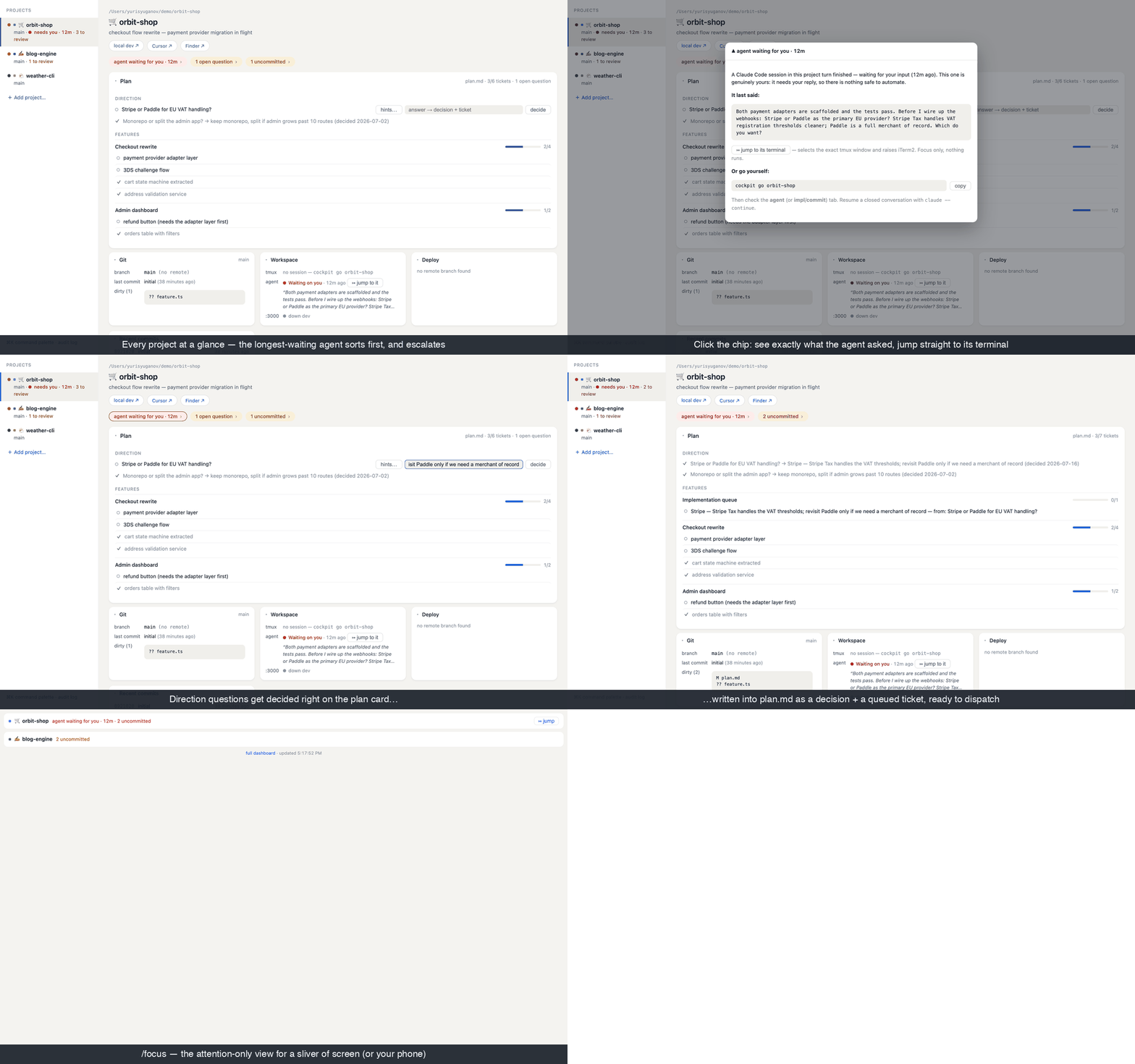
Morning: one glance, sorted by cost. cockpit list prints one line per project: branch, tmux, dev port, agent state, and what needs attention. The sort order is the whole philosophy: projects that need me float up, and among them, the agent that has waited longest is first. Waiting time is the real cost signal — an agent stalled for 25 minutes has been burning idle context for 25 minutes, and so has the task it's holding.
Chips, not dashboards-you-study. Each project shows its attention items as chips: agent waiting for you · 12m, 3 uncommitted, 2 open questions, behind remote. A chip is a button. Clicking it doesn't dump data on me — it explains the situation and offers the safest available exit: a fast-forward pull it can run itself, a copyable command for things I insist on typing (more below), or — for a waiting agent — the actual question the agent asked, read from the session, plus a button that lands me in the exact tmux window where it's waiting. Most of the time I don't even switch: I read what the agent said on the dashboard and decide whether it's worth my next context switch at all.
The plan lives in the repo. Every project has a plan.md: a ## Direction section with checkbox questions (the decisions quietly keeping the project in limbo) and ## Features with checkbox tickets. Plain markdown — readable in any editor, diffable, versioned with the code it describes. The dashboard renders it as the project's command center: open questions get an inline answer field; deciding checks the box, appends the decision with a date, and queues the answer as a ticket. Any open ticket is one click from becoming a briefed, attended Claude session in that project's tmux — visible, interruptible, watched. When I come back tomorrow, the plan file is the context reload.
Evening: the sweep. One more cockpit list. Uncommitted chips get resolved — usually by clicking "have Claude review & commit," which opens an attended session that groups changes into sensible commits and is structurally incapable of pushing. Waiting agents get answered or dismissed. The goal is a specific feeling: closing the laptop knowing nothing is silently waiting on me.
The three rules that made it trustworthy
A dashboard that can execute things in nine repos is a footgun unless it has opinions. Mine has three, and they're load-bearing:
1. Observe agents; never drive them. The cockpit watches Claude Code sessions (process + transcript traces, or precise hook events if you opt in) and tells me what they asked. It will never answer for them. The notch apps' headline feature — GUI approve/deny from a popup — is my explicit anti-feature: approving a permission away from the terminal's full context is exactly how agents run wild. The cockpit's job is to get me to the terminal fast, with context, not to replace it. The only thing it ever starts is an explicitly requested, fully attended session.
2. Safety tiers, enforced server-side. Every declared action is safe (runs on click), confirm (asks first), or manual — which the server refuses to run under any circumstances and hands back as a copy-paste command. git push is manual in most of my projects because push means production deploy. The UI can't weaken this; the enforcement isn't in the buttons, it's in the server. Everything lands in an append-only audit log.
3. No daemon, no cache, no state. Every refresh recomputes reality from git, tmux, lsof, and the filesystem. The only persistent files are a list of project paths, the audit log, and a token. Kill the dashboard, reboot the machine — nothing is lost, because nothing was ever stored. When a status tool caches, you eventually catch it lying, and then you stop glancing at it, and then it's decoration.
Honest limits
It's built for one specific desk: macOS, tmux, iTerm2, Claude Code, one user on localhost (Tailscale for the phone; never the open internet). Agent detection without hooks is heuristic by design — it reads undocumented traces and is never load-bearing. If you want GUI approvals and sounds from your notch, Ping Island is good open-source software and one level down the stack from this; they compose fine.
The point
The constraint of this decade of software work isn't going to be "can I get the code written." It's going to be: where is my attention worth spending right now, and what is silently waiting on me? That question deserves an instrument panel, whatever tool you build or adopt for it. Mine is on GitHub — MIT, no paid tier, built in the open because I'd rather have the conversation than the twenty dollars.
The agent that waited twenty-nine minutes this afternoon? Under the new sort order it would have been the first line on my screen, in red, with its question already visible. That's the whole product.
github.com/earlyadopter/project-cockpit · related: Building Agentic Systems, the book this workflow grew alongside.